Stop bending your business around software. Build the system around your business
Build or buy is the wrong question. Configure the standard parts, build only what is unique to you, inside the suite you already run.

Richard Mawer
Founder, Leadnamic Systems Ltd
You bought the software, you paid for the onboarding, and six months later your team is running the business in a spreadsheet alongside it. The software does not quite fit how you work, so you work around it, and the workaround becomes the system.
Let's be honest. That is how most small business software ends up. Not abandoned, just half-used, with the business quietly reshaped to suit the tool rather than the other way round.
For thirty years that was the only option. You bought what existed and fitted yourself to it. That has changed, and the change is the point of this post. You can now design the system your business actually needs, then configure what exists for most of it and build the pieces nothing else does. The question is no longer build or buy. It is which parts to configure and which parts to build.
Why does bought software never quite fit?
When I ask an owner how much of their CRM or project tool the team uses day to day, the honest answer in my experience is a fifth to a third of it. The rest sits there, paid for and ignored.
The reason is simple. The software was designed for ten thousand businesses, so it fits none of them exactly. A packaging manufacturer, a freight forwarder, and a firm of accountants do not run the same sales process, and a tool built to serve all three serves each of them roughly.
I ran a software agency for seven years. Every client needed something different from the same system, and our whole business existed to close the gap between what the software did and what the client needed. That gap is where the cost sits. Not the subscription, the months of a team working around a tool that was never shaped to them.
Bespoke is the first principle in the BUILD method for exactly this reason. A system that mirrors how your business actually works gets used. A system you have to fit yourself to gets worked around.
What has changed?
Two things, and together they shift where the line between buying and building sits. Modern suites can already be shaped to your process rather than the other way round, which I covered in the operating system post. These two are newer.
The first is that AI can now write working software from a plain English description. People call it vibe coding. You describe what you need, who will use it, and what it should produce, and the tool builds it. I built the 90-day planner app that goes with my next book in about three hours, from a PDF of the exercise and a brand guide. I have built six websites and a working prototype the same way. Three years ago each of those was thousands of pounds and months of a developer's time.
The second is that software can now talk to other software far more easily. Every modern tool has an API, a door other tools can knock on. And a newer standard called MCP, the Model Context Protocol, lets an AI assistant connect directly to your CRM, your accounts, your calendar, and act inside them rather than just talking about them. Think of it as the plug that lets AI reach into the tools you already run.
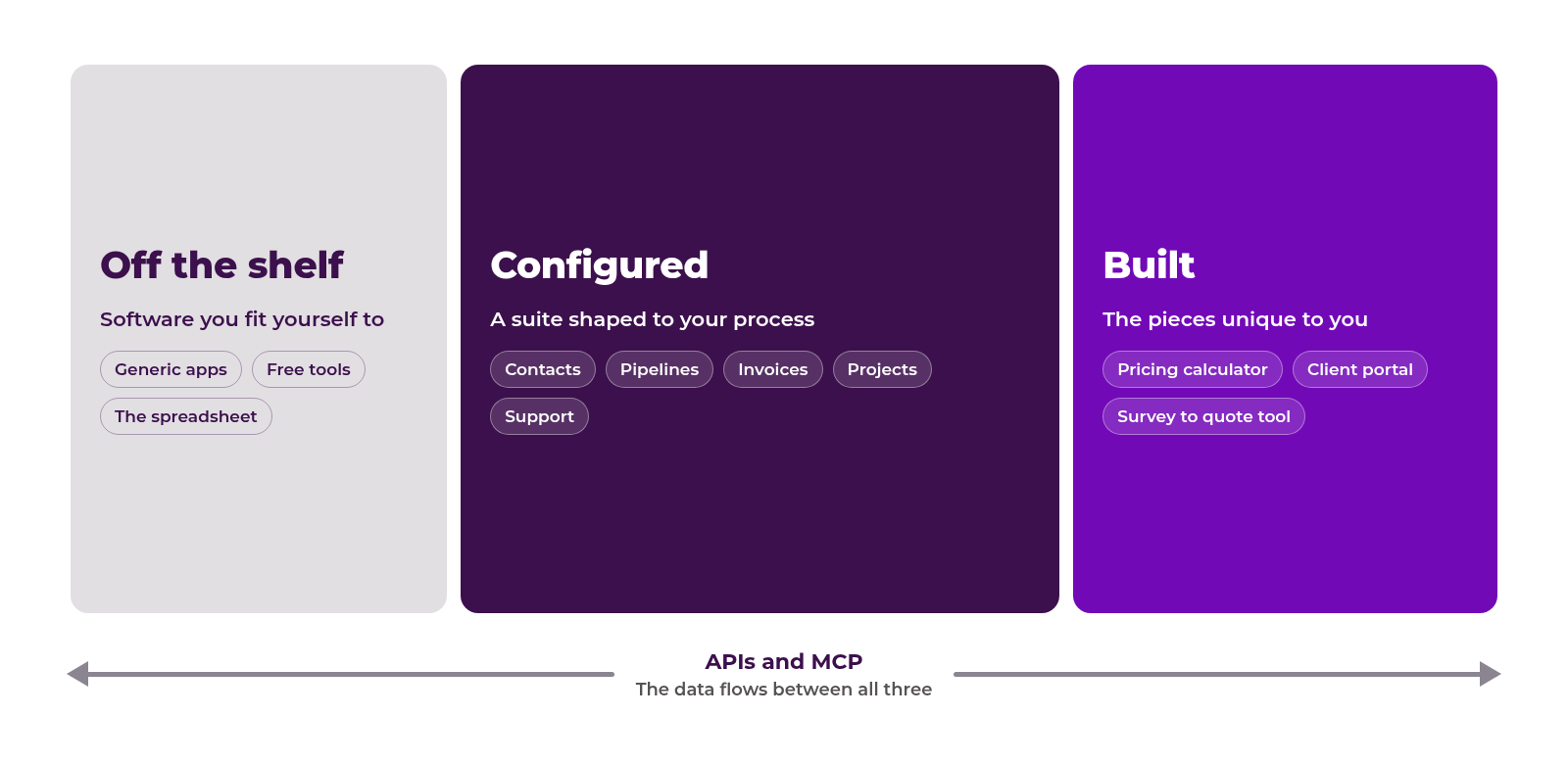
Put those together and a small business can design its own system for the first time. Configure the suite for the standard parts. Build the one piece that is unique to you. Connect them so the data flows.
Where is the line between configure and build?
Here's what I mean, from the most expensive lesson I have learned in business.
In 2024 I set out to build the system I wanted for my consultancy clients as software of my own. I built a working prototype myself with AI, in exactly the way I described above, and it did what I needed. Then came the hard part. Turning a prototype into a product other businesses could rely on meant a year of paying developers, raising money to pay them, and chasing a finish line that kept moving. When I finally costed what was left, the number was around £100,000, and the product would have reached the market a year behind tools that already existed and kept improving without me paying for it.
So I stopped. The lesson was not that building was wrong. It was that I had been building the wrong parts. The method, how to design a system around a business, was the valuable thing. The code for a CRM was not, because good CRMs already existed and could be shaped to each client. The prototype had taken me days. The year was spent rebuilding what I could have configured.
That is the line. Configure what exists for anything a thousand other businesses also need: contacts, pipelines, invoices, projects, support tickets. Build only what is unique to you: the calculator your sales team uses to price a job, the portal your clients log into, the tool that turns a site survey into a quote. Those are the pieces no suite will ever ship, because no one else needs them.
A client of mine installs electronic access gates. Head office worked fine on a configured system. The engineers did not, because they were in vans, in traffic, with a poor signal, logging jobs on a phone. So we configured the suite for the office and built a small separate tool for the engineers. One business, two parts of the spectrum, one connected system.
Where do the unique pieces get built now?
This is the part of the discovery that changed how I work. I describe it to clients as a box of Lego bricks. The suite my own consultancy runs on, Zoho One, is not one piece of software. It is fifty or so pieces that all click together, and a place inside it for building the pieces that do not come in the box. Zoho Creator builds custom apps with little or no code, and Zoho Catalyst gives developers a place to build the heavier pieces, and both sit inside the same suite as the CRM, the accounts, and the data layer.
That matters for three reasons. The piece you build is already connected to your data, so nothing has to be wired up afterwards. It inherits the suite's security, permissions, and audit trail, so the guardrails are there before you start rather than bolted on. And it is maintained inside something that is itself maintained, rather than sitting on its own waiting for the person who built it to remember how.
The engineers' tool above is exactly this kind of piece: a few screens inside the system the office already uses, not a separate app with its own login.
The tool is not the point. Any suite with a proper build layer gives you the same thing. The point is that you now start with a box of bricks that already fit together, and you only shape new ones for the few places the box runs out. That removes most of the reasons building used to be a bad idea.
What should you be careful of?
First, the ability to build something fast does not mean you should. Every piece you build is a piece you maintain. Before building anything, ask whether a configured tool does 80% of the job. If it does, configure it and live with the 20%, because the 20% will cost you more to own than it saves.
Second, anything you build or connect touches your data, and often your customers' data. A tool built inside your suite inherits its security, access controls, and audit trail. A tool built on its own in an afternoon has none of that unless you put it there. If you build outside the suite, design the guardrails before you connect anything, not after.
Where do you start?
Not with a tool. With a blank page.
Write down what your system must do for your business, in your words, before you look at what any software offers. What has to be captured, what has to flow where, what each person in the team needs to see and do each day. That is your system design, and it is the step almost everyone skips.
Then go through it line by line. Standard need, configure. Unique need, build or connect. You will find that most of the list is standard and a handful of lines are not. Those few lines are where custom building earns its keep.
The first version of your system should be mostly configured, with one small built piece at most. Get it used. Then add.
If you want to see how well your current software fits the business you actually run, the Clarity Scorecard takes five minutes and shows where the workarounds are.